No POS? KwickPhone is your POS — a full register with menus, modifiers, tabs, tables, retail, and inventory. And unlike every other register on earth, the phone orders walk in by themselves: the AI takes the call and the order lands in your queue, sized, modified, and paid.
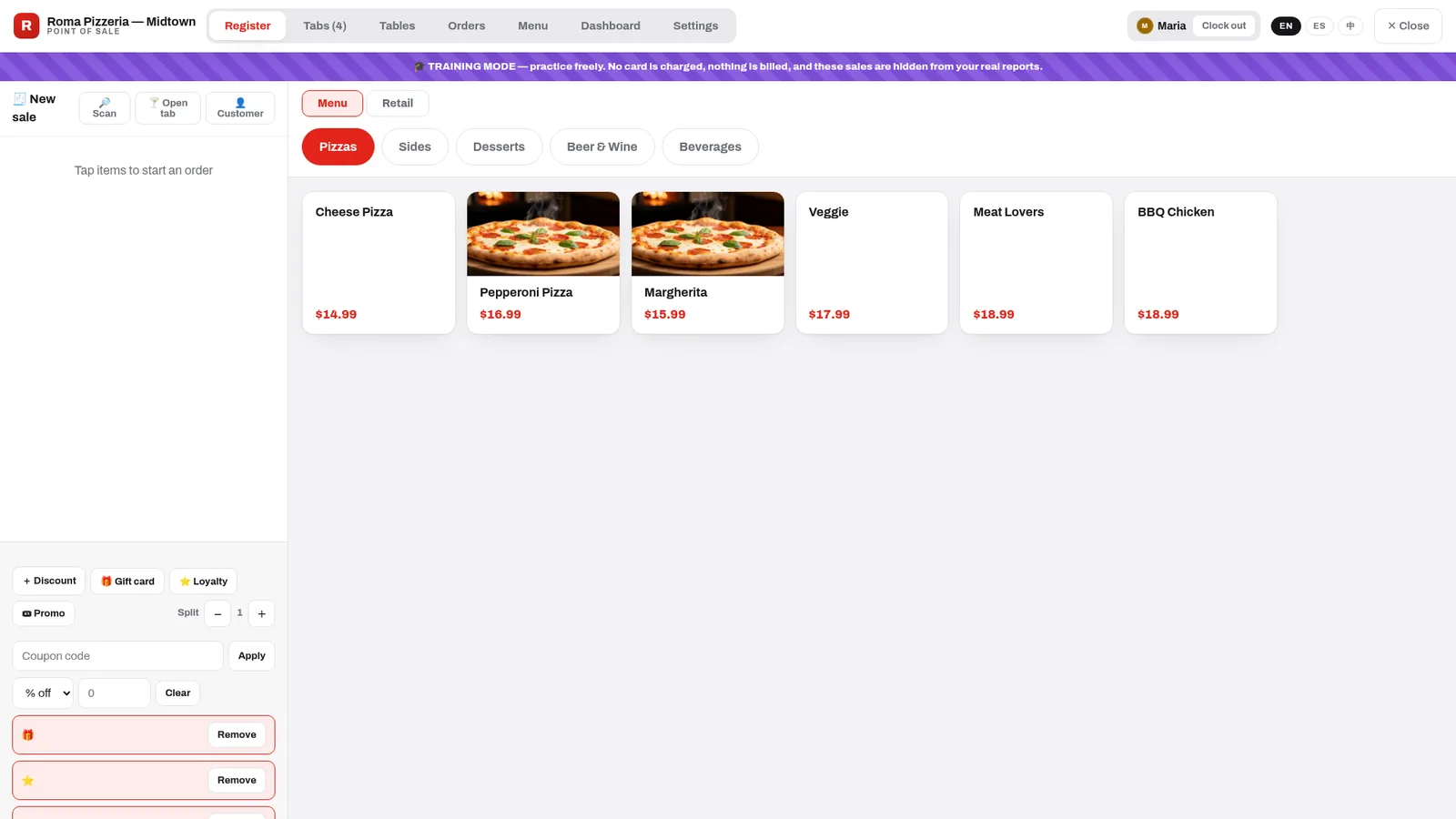
The real register — a pizzeria seeded from the starter library, two items photographed, Maria clocked in, four tabs open. The purple band is training mode: practice freely, nothing is billed, nothing touches your reports.
Screenshots regenerate from the live console — this product ships improvements weekly.
Tap the tile (photos sell — add them with the 📷 on any item), pick the size, add modifiers — required groups ask automatically, so a pizza never leaves without a crust choice. Cash or card, tip prompt if you want one, print or text the receipt.
The Retail toggle switches the grid to stock-tracked products: tap, search, or scan a barcode. Serialized items — phones, tools — prompt for the serial at checkout. Every retail sale depletes stock and records cost, so margins are real.
Open Tabs hold a party's rounds over time — with an optional card attached at open, so "keep it open" is safe and closing time is one tap. The register shows how many are running; auto-save means a dropped connection never loses a round.
The Tables view is your floor, drawn your way: drag tables into rooms and sections, rotate them to match reality, and read the room at a glance — who's seated, who's paying, what's free.
Build it three ways: pick a starter from the library — 11 restaurant types, pizzeria to full bar, complete with typical prices and the right modifier groups — let the AI import your menu from your ordering site into a reviewable draft, or build by hand with CSV up/down.
Whatever you approve is exactly what the AI offers on the phone — sizes, toppings, and all. It can never sell a dish you don't have.
Every new location starts in a striped-banner sandbox: practice sales are hidden from real reports, no card is ever charged, and the go-live checklist tells you when you're ready. Flip to live in one tap — and the sandbox stays forever, so every new hire trains on the real register with fake money. Production data and practice data never mix.
The Inventory console rides along free: vendors and purchase orders with receiving that updates costs, review-gated stock counts (a bulk CSV import creates a count to approve — never a blind overwrite), transfers between locations with cost carried and SKUs bridged, moving-average COGS and margin on every sale, and a reorder worklist that tells you what's running low. Serial tracking covers the full lifecycle — in stock, sold, returned, repaired.
Multi-location group? Transfers and roll-ups are part of the enterprise rails every account runs on.
Included on every plan — even the $0 one. If you have a POS you love, keep it: we integrate. If you don't, stop paying for one.
Yes — that's the whole point. Orders arrive in your queue sized, modified, and optionally paid, exactly like a walk-in sale. No callback, no re-keying.
A sandbox that's on by default for new locations: banner across the screen, practice sales hidden from real reports, no card ever charged. Go live when the checklist is green; the sandbox stays for onboarding staff.
Yes — attach a card when the tab opens; rounds accumulate; settle in one tap at close.
Counts are review-gated: whatever you count (or bulk-import by CSV) becomes a pending count a manager approves — the system never silently overwrites your on-hand numbers.
Yes — one cart takes both: menu items with modifiers and stock-tracked retail with barcodes and serials, in the same sale.
The console and the AI both work in English, Spanish, and Chinese.