Apps › Lodging PMS
KwickPhone Apps · Lodging PMS · Motels · Inns · Crew housing

The whole property, one tape chart.

Motels, inns, B&Bs, and the market the big PMS vendors ignore: workforce and crew housing. Every room and bed on one availability chart, block bookings for whole crews, company accounts that settle monthly, housekeeping that runs itself off a worklist — and an AI on your phone line that books rooms while you sleep. This is the complete manual.
Start free — first month on us Read the manual ↓
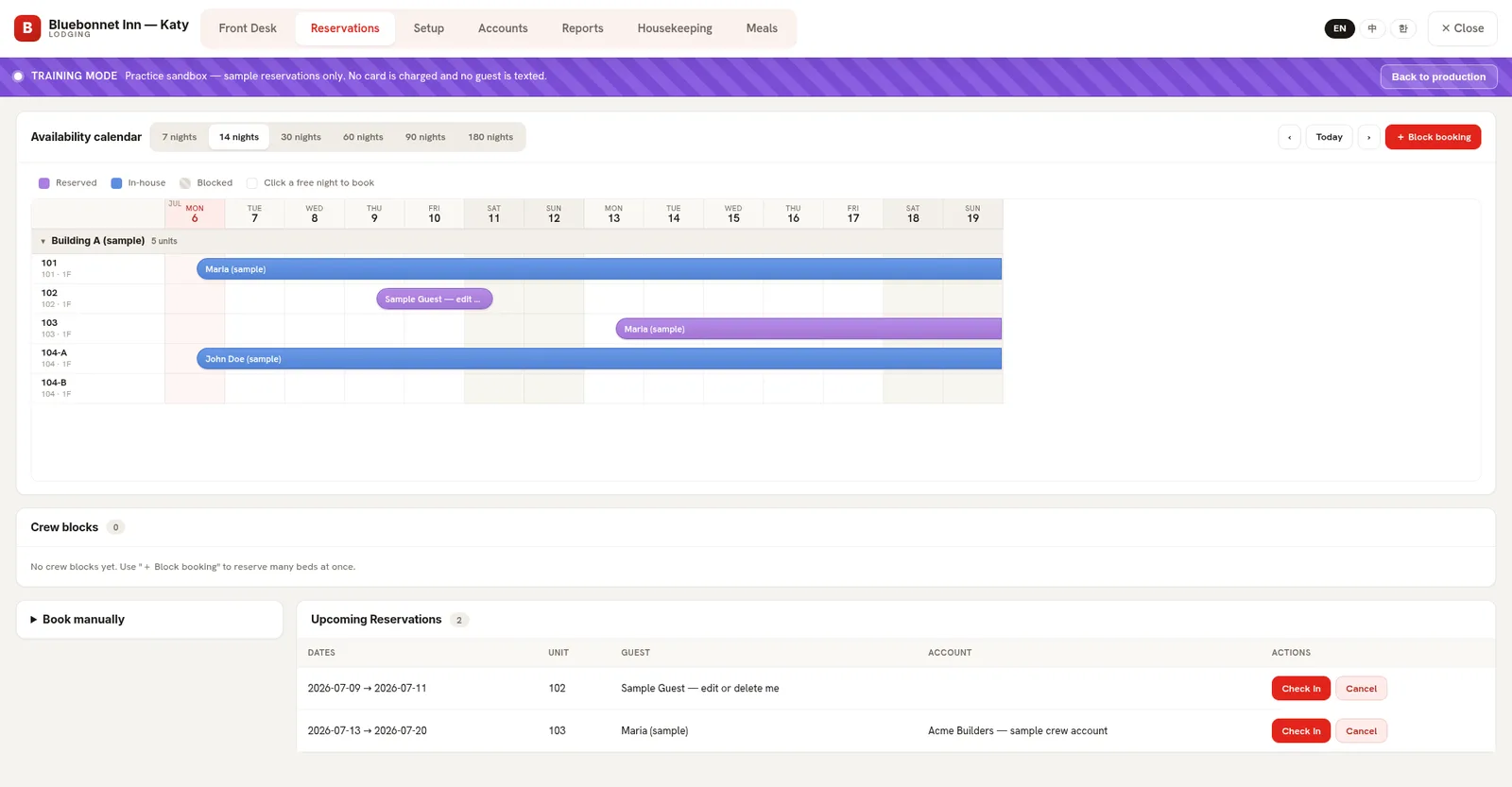
Lodging PMS availability tape chart: reserved and in-house spans across 14 nights, crew blocks section, upcoming reservations with one-tap check-in, and the training-mode banner

The real console — a sample inn on its availability chart: blue spans are in-house, purple are reserved, one tap on a free night books it. The purple band is training mode: sample data only, no card charged, no guest texted.

Screenshots regenerate from the live console — this product ships improvements weekly.

The story owners tell us

Sunday night at a 40-bed crew house

9:40 PM — a pipeline foreman calls: "I need beds for six guys, a month, starting Tuesday." The AI checks the chart, holds the block, and takes his company name. The whole conversation is over before the owner's phone would have finished ringing.

Monday morning — the owner opens the tape chart: one crew block spans six beds under "Acme Pipeline — net-30 account." Housekeeping's worklist already shows which rooms to turn first, oldest checkout on top.

Tuesday — six check-ins, six door codes issued automatically. End of month: one statement to Acme, one payment, every bed-night on the ledger. Nobody re-typed anything, anywhere.
The manual · Daily workflows

How your desk actually runs it

1

The tape chart is the property

Every building, floor, room and bed on one horizontal calendar — 7 to 180 nights out. Spans show who's in-house and who's arriving; click any free night to book it. Full? The chart says so honestly, and so does the AI on the phone.

Block booking reserves many beds in one motion — a crew, a wedding party, a sports team — under one account, every bed still tracked individually.

Tape chart close view: reservation spans across units with the block-booking button
2

Front desk: today, at a glance

The Front Desk tab is the day's truth: arrivals to expect, departures to chase, everyone in-house. Check a guest in and the system issues their door code automatically — manual codes by default, TTLock smart locks if you have them. Checkout revokes it and flips the room to the housekeeping queue.

Staff PINs keep the terminal honest: cleaners land on their worklist, front desk sees the desk, and every check-in records who did it.

Front Desk tab: today board with arrivals, departures and in-house guests, room grid by building and floor
3

Housekeeping that runs itself

The worklist orders dirty rooms oldest checkout first, shows blocked and maintenance units, and counts ready rooms by building. A cleaner opens their phone, works the list top to bottom, and taps rooms clean — no radio calls, no paper grid taped to the office wall.

Housekeeping tab: dirty-room worklist ordered oldest-checkout-first with ready counts by zone
4

Company accounts & real hotel numbers

Crew-housing's killer feature: a company account carries its crews' rooms, meals, and extras on a running ledger that settles on your schedule — weekly, net-30, whatever you agreed — with a clean statement. Individual guests still self-pay alongside.

Reports speak hotel: occupancy, ADR, RevPAR, revenue by unit type, accounts receivable — daily and over any range. Over-coffee numbers, not spreadsheet archaeology.

Reports tab: occupancy, ADR and RevPAR KPIs with daily revenue
What the AI does on a call

Your night auditor never sleeps

"Got anything for tomorrow night?" → The AI checks the real chart: "We have 12 rooms available." Full? "We're fully booked for those dates." It never oversells and never invents a vacancy.

"Book it — two nights, name's Rivera." → A real reservation lands on the tape chart with the guest's name and phone: "You're booked, Rivera — 2 nights starting tomorrow."

Same brain on your website chat — in English, Spanish, or Chinese, whichever the guest speaks.
Setup · An afternoon, not a consultant

From zero to first booking

1. Apps → enable Lodging. It opens in training mode — a sample building with rooms, guests and reservations to practice on.
2. Draw your property: buildings → floors → rooms → units, including shared rooms with lettered beds for crew housing. Pick hotel, motel, or labor-housing mode.
3. Set rate plans — nightly, weekly, monthly; company accounts can carry negotiated rates.
4. Add staff with PINs — each position sees exactly its tabs.
5. Practice a check-in and checkout, then go live. The sandbox stays for training every future hire.

A PMS that answers its own phone. Included.

The big PMS vendors charge hundreds a month and still let the phone ring. Lodging is part of every KwickPhone plan — even the $0 one — with the AI front desk attached.

Start free See pricing

Questions owners ask

Can the AI really book rooms by phone?

Yes — it checks the live chart, offers what's truly free, books with the guest's name and phone, and refuses honestly when you're full. The reservation is on your tape chart before the call ends.

What exactly is a crew block?

One booking that holds many beds — six welders for a month, a harvest crew for a season — under one company account, each bed still individually tracked for housekeeping and settlement.

How do company accounts settle?

Charges accumulate on the account's ledger — rooms, meals, extras — and you settle on your agreed schedule with a statement. Guests without an account just self-pay.

Do door locks work with it?

Check-in issues an access code and checkout revokes it. Manual codes work with any lock; TTLock smart locks integrate directly.

Does housekeeping need its own app?

No — cleaners PIN into the same console on any phone and land straight on their worklist, oldest checkout first.

Which languages?

The console is trilingual (EN/中文/한국어 shown per property type; ES available) and the AI answers guests in English, Spanish, and Chinese.