Apps › Appointments
KwickPhone Apps · Appointments engine · 12 trade skins

The calendar that books itself.

Every missed call at a salon is a missed appointment. KwickPhone Appointments puts an AI on your phone, texts, and website that checks real availability, books the slot, and collects the deposit — then hands you a drag-and-drop calendar your whole team can run. This is the complete manual.
Start free — first month on us Read the manual ↓
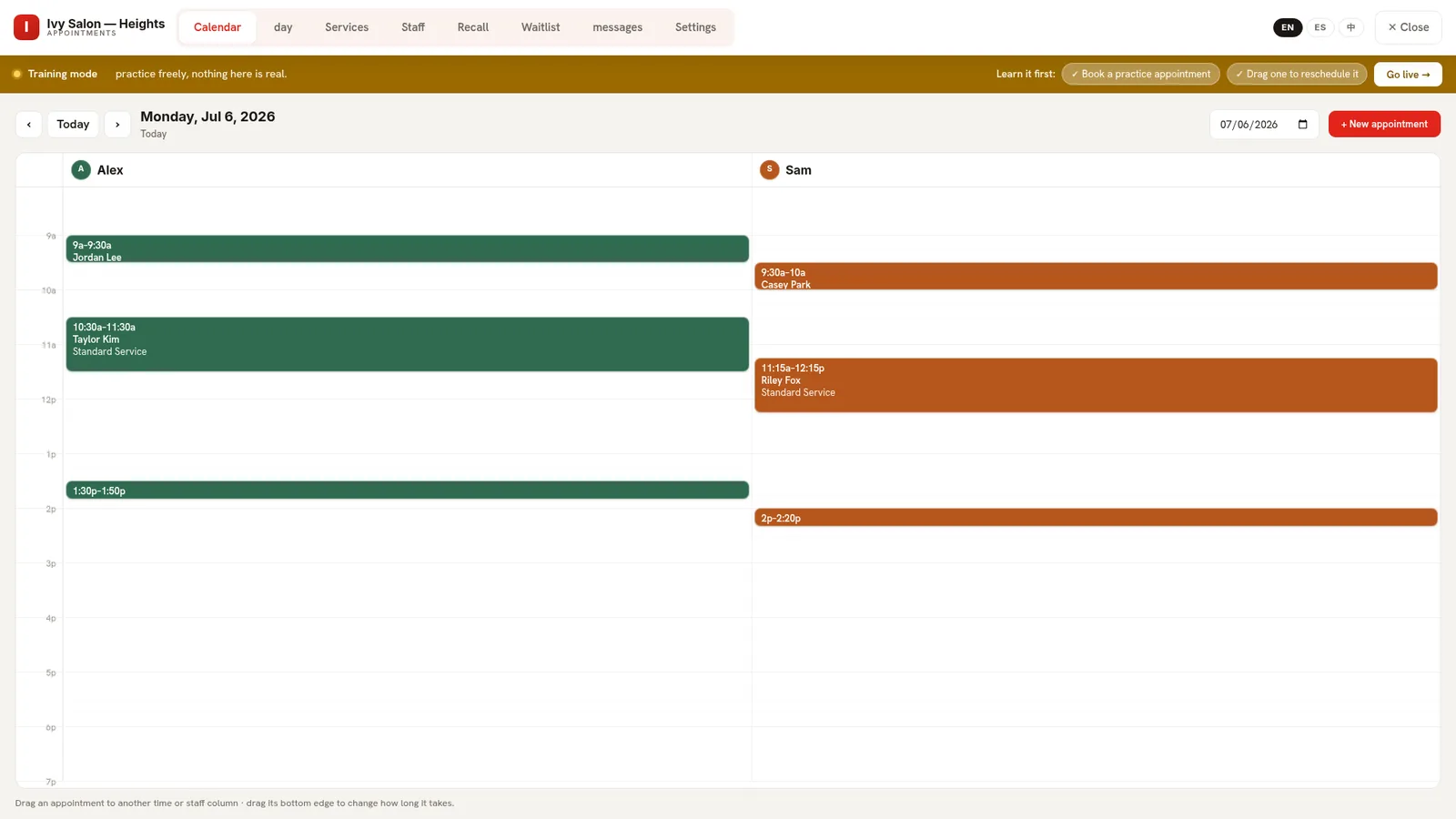
KwickPhone Appointments console: multi-staff day calendar with color-coded appointments in Alex and Sam's columns, training-mode banner, and language pills for English, Spanish and Chinese

The real console — a two-chair shop on a Monday. Every block was booked by the AI or dragged into place by a human. (Training mode shown: every new location starts in a safe sandbox.)

The story owners tell us

A Tuesday at a two-chair barbershop

9:02 AM — the shop's still closed, clippers not even plugged in. A regular calls: the AI offers 10:30 with Alex, books it, texts the confirmation.

11:15 — a new customer books online while Sam's mid-fade. New face, so the deposit policy kicks in automatically: a $25 hold, paid by texted link before the slot is locked.

1:40 PM — a cancellation. The ASAP waitlist texts the next customer who wanted an earlier time; the gap fills itself before anyone notices.

Nobody at the shop touched a phone. That's the product.
The manual · Daily workflows

How your team actually runs it

1

Rescheduling is a drag — literally

Marco calls: "can we push my 10:30 to the afternoon?" Grab his block, drag it down the column — or across to another staff member. The block stretches live and snaps to your slot grid; nothing commits until you release. Need more time for a color correction? Drag the bottom edge to extend the appointment.

If a move would collide with another booking, the calendar refuses and tells you why — no silent double-booking, ever.

Close-up of the drag-and-drop calendar: appointment blocks with times and customer names in two staff columns
2

No-shows start paying for their chair

Open Settings and set a deposit policy: a flat amount or a percentage, required always, for new customers, or — the owners' favorite — automatically once someone has no-showed you twice. The AI applies the policy on every booking it takes: card on file when they have one, a texted PCI-compliant payment link when they don't.

Calendar chips show deposit status at a glance — required, link sent, paid, forfeited. Mark a no-show and the deposit forfeits with an audit trail behind it.

Appointments settings tab: business hours, booking rules and the no-show deposit policy controls
3

Recall: the calendar that refills itself

Dental cleanings every six months. Color touch-ups every five weeks. The Recall tab tracks when every customer is due and texts them to rebook at exactly the right moment — the quiet engine behind a full future calendar.

Beside it, the ASAP waitlist: customers who wanted an earlier slot get texted automatically the moment a cancellation opens one. Cancellations stop costing money.

Recall tab listing customers due to rebook with reminder controls
4

Services are the AI's vocabulary

Every service you define — name, duration, price — becomes something the AI can offer and schedule correctly. A 20-minute beard trim never lands in a 60-minute slot. Staff each get a column and a color; upload real photos and the whole console feels like your shop, not software.

Insurance-based trades get one more tab: your accepted plans, so the AI answers "do you take Aetna?" honestly from your list — in or out of network, never a guess.

Services tab: each service with duration and price that the AI offers to callers
What the AI does on a call

Four verbs, spoken in three languages

On the phone, in a text thread, or in website chat — the same brain, checking your real calendar.

The caller says…The AI doesBehind the scenes
“Got anything tomorrow?”“Open times: 9:00, 9:30, 10:00, 10:30.”Checks true availability per service and staff member — only real open slots are ever offered.
“Book me the 10:30.”“You're booked for 10:30 on Wed Jul 8.”Creates the appointment on the right staff column; applies your deposit policy; texts the confirmation.
“I need to cancel.”“Your appointment is cancelled.”Finds their upcoming booking by phone number; the waitlist immediately offers the freed slot to whoever wanted it.
“Do you take Cigna?”“Yes — we're in-network with Cigna.”Answers from your accepted-plans list — your out-of-network note, verbatim, when you're not.

Deposits ride the same call: “I'll put a $25 deposit on your Visa ending 1234 to hold it — okay?” — PCI-compliant, no card number ever spoken.

Setup · 10 minutes, no consultant

From zero to first AI booking

1. Apps → enable Appointments (or your trade's skin). It opens in training mode — sample staff, sample bookings, nothing real.
2. Add your services with durations and prices.
3. Add your staff — each gets a column, a color, optionally a photo.
4. Set hours and, if no-shows hurt, the deposit policy.
5. Book one practice appointment, drag it once — the go-live checklist turns green. Tap Go live. The sandbox stays available for training new hires forever.

Prefer talking to typing? Set the whole thing up by phone — the AI interviews you and builds your knowledge base from the conversation.
One engine · 12 trades

Your trade speaks its own language

The same engine wears twelve skins — each with its trade's vocabulary, defaults, and booking rhythm:

Included on every plan. Even the $0 one.

Appointments isn't an add-on — it's part of the front desk. Start free, practice in the sandbox, and let the AI take its first booking today. Questions right now? The concierge in the corner knows this manual.

Start free See pricing

Questions owners ask

Can the AI really book by itself?

Yes — phone, text, or web chat. It checks real availability, offers open times, books the slot on the right staff column, and confirms by text.

How do no-show deposits work?

Flat or percentage; required always, for new customers, or automatically for repeat no-shows. Collected PCI-compliantly — card on file or a texted pay link. Calendar chips show the status; forfeits are audit-logged.

What if two people want the same slot?

They can't get it. Availability is checked at booking time and the calendar refuses conflicting moves — no double-booking, human or AI.

Does it sync with Google or Apple Calendar?

Yes — a live ICS feed subscribes your existing calendar to the book, and a public self-booking page lets customers book without calling at all.

Which languages?

English, Spanish, and Chinese — the AI books in the caller's language; the console itself switches with one tap.

Is my staff's training data mixed with real bookings?

Never. Training mode is a separate sandbox — practice bookings can't leak into production, and the sandbox stays available for onboarding new staff.